Thursday, May 5, 2011

Breadcrumbs 4: Super Mario Galaxy

In Super Mario Galaxy there are planets floating around that Mario can walk all around. Some planets are spheres or odd shapes and have no up or down association, but other planets are coin shaped and have two sides to them.

First time you encounter a little planet with a flip side to it, they need to explain it visually to the player. Get the idea that theres a entire other side to the rock your standing on, probably with more stuff being on the other side.

But the player can't see it at all because it's on the other side and whatever the player doesn't see isn't there.

I'm sure you could explain it to someone all day using text on a sign post.

Well, maybe you could, but "walk off the side of the world!" Just looks kinda silly.

I think how they chose to do it is a little genius. They actually use two differant methods right next to eachother.


One part is a bridge that goes over the lip of the world and wraps around. This works really well as a visual queue to the player expressing where to walk.

The second other method, is the warp pipe that just warps to the other side directly below it. Probably redundancy in case the bridge doesn't coax someone, they'll travel down the pipe and get to there destination.

Breadcrumbs 3: Athena

I've recently gotten access to a GameTap account. There are a lot of old interesting games that no one cares about anymore (but should).

I came upon a game called Athena. Never heard of it before, I don't know anything about it.

I recorded a video of me playing..


It does some interesting things in the beginning to explain a couple of ideas really simply.


After a short battle the player comes upon this lonely stump. After the player realizes theres a jump button and jumps over it (and takes care of that enemy), there confronted with this wall thats taller then there jump can take them.


After a short while it becomes apparent that if you whack it with an attack, it destroys bits of the wall letting you pass.


Another interesting little thing is that Athena can climb up and down vines.


With enemies spawning and power-ups making an appearance on top of this little hill, it becomes apparent that you should be able to get up there. Thats when you realize that you can climb a vine.

Then you see the vine going down and wonder; "If I can climb UP a vine, can I climb down?"

You do, to find out that theres a whole other level and that it goes up and down not just from left to right.


For the record I have no clue how to deal with the cupid enemy that shoots arrows at you. It seems absolutely unfair.

Also I'm skipping over how the very first thing that happens to the main character is that the wind blows her dress off. I'm going to take it as symbolism for Athena getting down to business.

Wednesday, May 4, 2011

Coin Crumbs 2

Here is another instance of collectibles used as bread crumbs.

This time a sole Yoshi coin is used at the top of a hill.


The purpose being to entice the player to climb up, grab it, then learn that they can slide down to kill that Rex that's walking up the slope.

Coin Crumbs 1

I was playing super mario world and I noticed they use coins a lot as bread crumbs to explain to the player where to go.

This is one of the earlier examples of it.


If your running when you come upon these coins and jump to grab them, your arch will carry mario up to the Yoshi coin and bring him down right onto the little shell enemy.

Showing you that you can collect those Yoshi coins and jumping on stuff kills it! All in one little coin arch.

Wednesday, February 2, 2011

Interplanetary Conquest (in Tetris Worlds)

Picture, if you will, a proud race of Minos. Living out there lives, oblivious to their surroundings. Until, one day, they realize there sun is about to explode and everything becomes a mad dash to leave there solar system and find respite on other planets.

Six Tetrinauts are sent to six different planets deemed terraform-able and to "ready" the planet for the impending mass exodus of Minos.

When the Tetrinauts arrive on the lush, fertile planet of Deneb, they are greeted with this...


The kingdom of the apparently equally as proud Denebians. Of course, this doesn't phase the Tetriminos. The conquest must continue. Poor Denebians.

I think they plan on them being a food source.

Tuesday, November 16, 2010

Color Theory Part II: The Theory (or Color Design)

A while back, I was going to talk about the design aspect of color a little more. Knowing how to get different colors is important, but knowing what colors your working towards is more important.

I'm going to relate everything in terms of my own game Cygnus, because I put a lot of effort into the color design. Well, the first level at least, which dictated the colors I would use in subsequent levels. The player ship for example...


...when it came time to decide the color for the player ship, I could have chosen any color in the world, obviously, but I knew I wanted the color to represent something; stand out and be unique. There have been a lot of games where the player's ship is of a boring color and I definitely didn't want that for Cygnus. Also, I wanted the player to be able to know where there ship was among all the other lines.

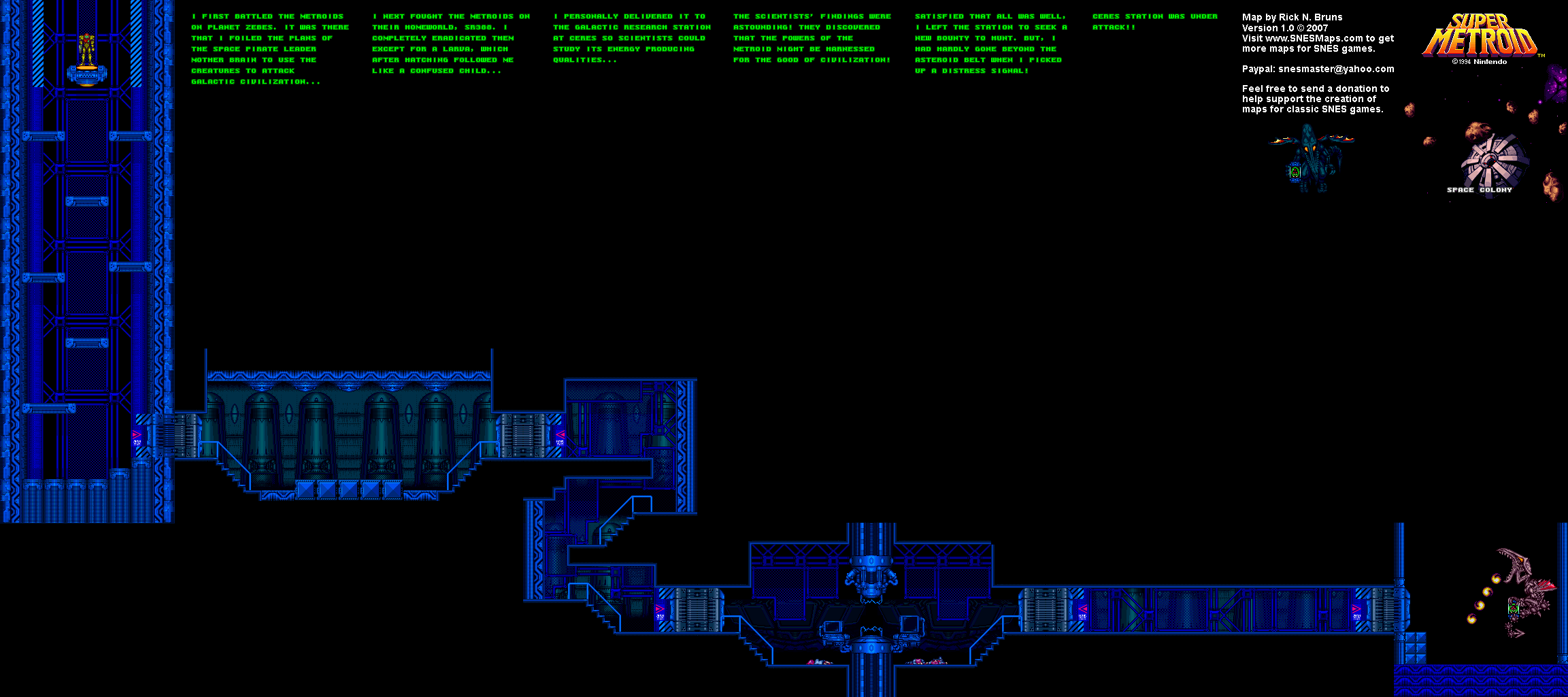
One day, Nick was playing Super Metroid for the first time and I noticed that the over all color of Samus's suit (bright yellow) was an 'almost' exact compliment of the color of the very first level, which was a cold blue.


These two colors came together to really visually give the impression that this area was cold, old and Samus didn't belong and was trudging through, really upsetting the place. Also it was very visually stunning.

I knew from that, that the player's color in Cygnus should be a compliment to whatever the first level was. Since I knew the first level was going to be some sort of dirt-ish planet. I chose a light brown that I liked. Which actually ended up affecting the choice for every other color in the game; because I got the player compliment color from this, and each world had to be visually different. Since everything in the game is drawn with just lines, being different meant having a unique color. (And animation, but that's a differant post.)

So the "compliment" for the brown that I chose was a mute blue.


Also, since Gravitar was a big influence on the look and play of the game, I wanted to have the spawner be the same colors and animation as the spawner on Gravitar. So that blew the nice color compliment but it's okay cause it gives the first level a cohesive prop, which maybe the second screen doesn't have.

Since walls kill you, I really didn't feel the need for enemies, but, for things that move and animate around a lot, I colored red to let the player know that they are more dangerous than a wall.

- Tony

Top-Secret P.S. - I forgot to comment out a piece of code in Cygnus that let's you hit the 'F' key for brakes. It was a line I wrote very early on when I was testing the movement code. It also sets your fuel to exactly 10. So if your going for a high fuel score don't press it, cause' it will cause your fuel to reset.

Tuesday, September 14, 2010

color theory Part I : The tech

The first time you look at something like this

255, 94, 0

your like whaa?? But once you figure out what it is and you use it a while you start seeing it more like this


Or at least hopefully you do. Those three numbers separated by comas, is the RGB that describes a color to the computer. The first one is red, followed by green then blue. You combine those three colors and you will get the color your looking for.

Natively.

Theres another way for the computer to use those numbers. instead of "RGB" the alternative way is "HSL". (well to be honest the computer can do ANYTHING it wants with those numbers. But I really want to talk about HSL cause its fun.)

-The 'H' stands for "hue", which basically defines the color.
-The 'S' stands for "saturation", which basically means all white or all hue. or anywhere in between.
-The 'L' stands for "lightness", which also basically means all black or all hue. or (again) anywhere in between.

This is cool because using RGB can be very difficult if you, say, want to take a color and just make it darker. or would like to cycle through colors to create one of those psychedelic Jeff Minter style things. if you had the color defined as HSL you could just change the H "hue", and you got a different color with the same brightness and saturation. This is how i did the rainbow level in Cygnus.

Now, I know what your saying, Tony!, this sounds AWESOME but how do I convert to and from RGB and HSL? Well I found this c# code online a while ago,


And I converted it to c++ and using openFrameworks(OF is awesome!). This bit will take an RGB color and convert it to HSL...

// Given a Color (RGB Struct) in range of 0-255
// Return H,S,L in range of 0-1
static ofColor twRGB2HSL (ofColor rgb)
{
float r = rgb.r / 255.0f;
float g = rgb.g / 255.0f;
float b = rgb.b / 255.0f;
float v;
float m;
float vm;
float r2, g2, b2;

float h = 0; // default to black
float s = 0;
float l = 0;
v = max(r,g);
v = max(v,b);
m = min(r,g);
m = min(m,b);
l = (m + v) / 2.0;
if (l <= 0.0)
{
ofColor hsl;
hsl.r = h;
hsl.g = s;
hsl.b = l;
return hsl;
}
vm = v - m;
s = vm;
if (s > 0.0)
{
s /= (l <= 0.5) ? (v + m ) : (2.0 - v - m) ;
}
else
{
ofColor hsl;
hsl.r = h;
hsl.g = s;
hsl.b = l;
return hsl;
}
r2 = (v - r) / vm;
g2 = (v - g) / vm;
b2 = (v - b) / vm;
if (r == v)
{
h = (g == m ? 5.0 + b2 : 1.0 - g2);
}
else if (g == v)
{
h = (b == m ? 1.0 + r2 : 3.0 - b2);
}
else
{
h = (r == m ? 3.0 + g2 : 5.0 - r2);
}
h /= 6.0;

ofColor hsl;
hsl.r = h;
hsl.g = s;
hsl.b = l;
return hsl;
}


And this next bit will convert from HSL back to RGB...


// Given H,S,L in range of 0-1
// Returns a Color (RGB struct) in range of 0-255
static ofColor twHSL2RGB(float h, float sl, float l)
{
float v;
float r,g,b;

r = l; // default to gray
g = l;
b = l;
v = (l <= 0.5) ? (l * (1.0 + sl)) : (l + sl - l * sl);
if (v > 0)
{
float m;
float sv;
int sextant;
float fract, vsf, mid1, mid2;

m = l + l - v;
sv = (v - m ) / v;
h *= 6.0;
sextant = (int)h;
fract = h - sextant;
vsf = v * sv * fract;
mid1 = m + vsf;
mid2 = v - vsf;
switch (sextant)
{
case 0:
r = v;
g = mid1;
b = m;
break;
case 1:
r = mid2;
g = v;
b = m;
break;
case 2:
r = m;
g = v;
b = mid1;
break;
case 3:
r = m;
g = mid2;
b = v;
break;
case 4:
r = mid1;
g = m;
b = v;
break;
case 5:
r = v;
g = m;
b = mid2;
break;
}
}
ofColor rgb;
rgb.r = r * 255.0f;
rgb.g = g * 255.0f;
rgb.b = b * 255.0f;
return rgb;
}


The code isn't formatted very well here, but i'm lazy so I don't care.

Coming...(maybe)... color theory part II : The theory